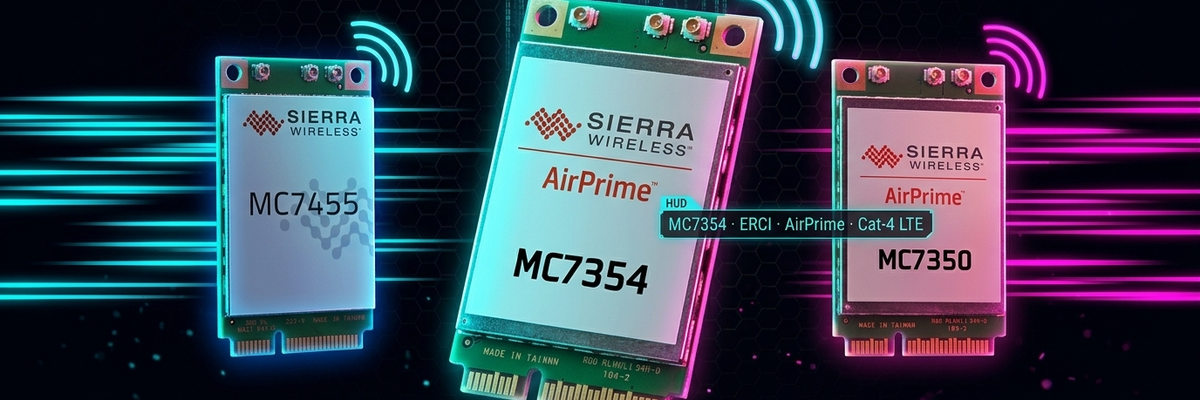
Sierra Wireless Cellular Module Buyer's Guide: From LTE Cat 4 to 5G mmWave
Table of Contents
Whether you are a student building an IoT project or an engineer developing networking hardware in a lab, the worst part of buying a cellular module is the same: you stare at spec sheets for an hour, the model numbers blur together, and you end up with the wrong form factor that will not fit your board.
This guide walks through all ten current and long-running Sierra Wireless modules (now part of Semtech), from entry-level LTE Cat 4 all the way to 5G mmWave. Every EM-series module covered here uses M.2 packaging, while the MC series uses mPCIe.
Technical data in this article is compiled by Yopitek.
The Ten-Module Spec Sheet at a Glance#
The table below is compiled from official spec sheets so you can compare the lineup side by side. One note: peak uplink figures for the EM9190/EM9191 may vary slightly between sources. If you are purchasing for a production project, check the latest official spec sheet or confirm with us before ordering (links are in the appendix).
| Model | Cellular Standard | Chipset | Peak Download / Upload | Carrier Aggregation | 5G | mmWave | Form Factor | GNSS | Notes |
|---|---|---|---|---|---|---|---|---|---|
| EM7430 | LTE-A Cat 6 | Qualcomm MDM9230 | 300 / 50 Mbps | 2×CA | — | — | M.2 | ✓ | Entry-level Cat 6 (confirm band configuration) |
| EM7455 | LTE-A Cat 6 | Qualcomm MDM9230 | 300 / 50 Mbps | 2×CA | — | — | M.2 | ✓ | Most popular in the open-source community |
| EM7511 | LTE-A Pro Cat 12 | Qualcomm SDX20 | 600 / 150 Mbps | 3×CA | — | — | M.2 | ✓ | High-uplink Cat 12 |
| EM7565 | LTE-A Pro Cat 12 | Qualcomm SDX20 | 600 / 150 Mbps | 3×CA | — | — | M.2 | ✓ | Supports CBRS/LAA bands; most bands and highest uplink |
| EM9190 | 5G NR Sub-6 | Qualcomm SDX55 | 2.5 Gbps down (uplink peak on request) | 8×CA | ✓ | — | M.2 | ✓ | Budget Sub-6 5G entry point |
| EM9191 | 5G NR Sub-6 + mmWave | Qualcomm SDX55 | Up to 4.5 Gbps down incl. mmWave / 2.5 Gbps Sub-6 (uplink peak on request) | 8×CA | ✓ | ✓ n260/n261 | M.2 | ✓ | Flagship 5G with mmWave |
| MC7304 | LTE Cat 4 | Qualcomm MDM9215 | 150 / 50 Mbps | — | — | — | mPCIe | ✓ | Entry-level Cat 4 (near EOL) |
| MC7350 | LTE Cat 4 | Qualcomm MDM9215 | 150 / 50 Mbps | — | — | — | mPCIe | ✓ | Cat 4, North America bands |
| MC7354 | LTE Cat 4 | Qualcomm MDM9215 | 150 / 50 Mbps | — | — | — | mPCIe | ✓ | Cat 4, global bands |
| MC7455 | LTE-A Cat 6 | Qualcomm MDM9230 | 300 / 50 Mbps | 2×CA | — | — | mPCIe | ✓ | Effectively the mPCIe version of the EM7455 |
Note: The EM9190 and EM9191 share the same EM919x/EM7690 spec document. The EM9190 is the budget Sub-6 5G option, while the EM9191 adds mmWave for the flagship tier. Downloading the official spec sheet requires a registered account, so the downlink figures above are compiled from public sources. For uplink peaks and other fine details, confirm the latest revision with us before you place an order.
First Hurdle: What Is the Difference Between the EM (M.2) and MC (mPCIe) Series?#
This is the most common trap for first-time buyers, and getting it wrong is genuinely awkward: the module simply will not fit.
EM series = M.2 B-Key packaging. Think of the interface used for SSDs inside a laptop: it is compact, roughly 30 x 42 mm. These modules are designed for laptop WWAN slots and embedded M.2 connectors, which is what most newer industrial motherboards and mini PCs use.
MC series = Mini PCIe (mPCIe) packaging. Visually similar to the expansion cards found in older computers, these suit the mPCIe slots of legacy industrial routers and panel PCs. If your board only has an M.2 slot, using an MC module requires an M.2-to-mPCIe adapter board.
What they share: Both need an external SIM card holder and antennas. Antenna connectors are typically U.FL, with a standard 2x2 MIMO setup (one main antenna plus one diversity antenna) and an additional GNSS antenna for positioning.
The question everyone asks: What is the real difference between the EM7455 and MC7455? The answer: the same chip, only the packaging differs. Both cards use the Qualcomm MDM9230 with identical specs, so the choice comes down entirely to what your board looks like.
Recommendations by Use Case#
1. Building Your Own Router / CPE (OpenWrt or ROOter)#
Pick: EM7455 / MC7455 Simple reason: the open-source community has the most resources for these. If you use ROOter (an OpenWrt-based firmware), the tutorials and QMI/MBIM configuration examples are comprehensive, and a quick web search will get you out of almost any jam.
2. Upgrading an Older Laptop’s WWAN Card#
Pick: EM7430 / EM7455 Both are M.2 and match the WWAN slots of business laptops from Dell, Lenovo, and others. The EM7455 especially tends to be attractively priced on the secondhand market and is a favorite upgrade, though confirm the bands match your carrier before ordering.
3. Industrial Routers / IoT Gateways (Durability and Wide Temperature)#
Pick: EM75 series (EM7511, EM7565), EM9190/EM9191, MC7455 For industrial projects, what matters is wide operating temperature (think -40°C to +85°C), complete certifications, and long-term availability. Cat 12 and 5G modules offer more uplink bandwidth and headroom for future expansion. Confirm the actual temperature ratings against the latest official documentation.
4. Connected Vehicles / Fleet Tracking (GNSS Required)#
Pick: EM7455 / EM7565 / EM9191 Telematics projects usually need accurate positioning. All three have built-in GNSS, solving connectivity and location in one card. If you need 5G bandwidth, go straight to the EM9191.
5. 5G Private Networks / CBRS Experiments#
Pick: EM9191 (CBRS bands), EM7565 (CBRS/LAA bands) If you are researching CBRS (the US 3.5 GHz shared band) or LAA in the lab, both modules support it in hardware. That said, field-testing a private network depends on local regulations and the carrier environment, so talk through the technical details with us before deployment.
6. Video Surveillance / High-Definition Streaming Backhaul#
Pick: EM9190 / EM9191 With 5G bandwidth this generous (up to 2.5 Gbps down on Sub-6, and up to 4.5 Gbps with mmWave), these are ideal for real-time multi-stream video backhaul or 4K streaming.
7. Repairing Legacy Equipment / Spare Parts for Older Lab Machines (Cat 4)#
Pick: MC7304 / MC7350 / MC7354 These are the first choice for servicing mPCIe-based legacy machines. To be frank, though, the MC73xx family is approaching EOL (end of production). For long-running projects, moving to the EM7455 or EM7565 is the safer call.
Still Unsure? Let Us Help#
If you are still stuck after reading through, you can source all ten EM/MC cellular modules through Yopitek, together with antennas, SIM adapters, or evaluation boards. Whether you need to verify specs, compare bands, or get a quote and technical support for a project, we are here to help.
Frequently Asked Questions#
Frequently Asked Questions
Which Sierra Wireless modules are available, and how do they differ?
Sierra Wireless currently offers ten modules across two families, EM and MC, spanning LTE Cat 4, Cat 6, Cat 12, 5G Sub-6, and mmWave. The main difference is packaging: EM modules use M.2 and MC modules use mPCIe. Models sharing the same chipset, such as EM7455 and MC7455, perform identically and differ only in connector shape.
Are the EM7455 and MC7455 the same chip?
Yes. Both use the Qualcomm MDM9230 chipset with identical 300/50 Mbps peak speeds and 2xCA carrier aggregation support. The only difference is the packaging: EM7455 is M.2 and MC7455 is mPCIe.
Do I need the mmWave EM9191 for 5G projects? Will it work in Taiwan?
Not necessarily. Taiwan's 5G networks currently rely mainly on Sub-6, while mmWave is mostly deployed in US-style environments (bands n260/n261). For most projects in Taiwan, the EM9190 (budget Sub-6 5G) is sufficient; choose the EM9191 only if you have a genuine US mmWave testing requirement.
How do I choose between M.2 and mPCIe cellular modules?
It depends on your hardware slot. Laptops and modern embedded boards typically use M.2 B-Key, so choose the EM family. Older industrial routers and panel PCs with mPCIe slots take the MC family. If your board only has M.2 but you want an MC module, you will need an M.2-to-mPCIe adapter.
Where can I buy Sierra Wireless modules?
You can source the full Sierra Wireless cellular module lineup through Yopitek. Browse the Yopitek product pages for models and pricing, or email [email protected] directly.
Appendix: Official Spec Sheet Links for All Ten Models#
The links below point to Sierra Wireless’s official technical resource library (source.sierrawireless.com). Some documents require registration before you can download the PDF. The figures in this article are compiled from public sources; if you need item-by-item confirmation of the finest details (such as EM9190/EM9191 uplink peaks), contact us and we will share the latest official documents.
- EM7430: https://source.sierrawireless.com/resources/airprime/minicard/74xx/airprime_em7430_product_technical_specification/
- EM7455: https://source.sierrawireless.com/resources/airprime/minicard/74xx/airprime_em7455_product_technical_specification/
- EM7511: https://source.sierrawireless.com/resources/airprime/minicard/75xx/airprime_em7511_product_technical_specification/
- EM7565: https://source.sierrawireless.com/resources/airprime/minicard/75xx/airprime_em7565_product_technical_specification/
- EM9190 / EM9191: https://source.sierrawireless.com/resources/airprime/minicard/airprime_em919x-7690_product_technical_specification/
- MC7304: https://source.sierrawireless.com/resources/airprime/minicard/airprime_mc7304_product_technical_specification_and_customer_design_guidelines/
- MC7350: https://source.sierrawireless.com/resources/airprime/minicard/airprime_mc7350_product_technical_specification_and_customer_design_guidelines/
- MC7354: https://source.sierrawireless.com/resources/airprime/minicard/airprime_mc7354_product_technical_specification_and_customer_design_guidelines/
- MC7455: https://source.sierrawireless.com/resources/airprime/minicard/74xx/airprime_mc7455_product_technical_specification/