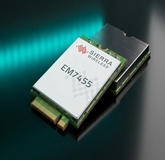
Sierra EM7455 Full Review: Why It Is the Favorite Sierra Card for Makers and Labs
Table of Contents
If you have played with a Raspberry Pi running OpenWrt, or wanted to add 4G to lab equipment, you have heard of the Sierra EM7455. It is an LTE-A Cat 6 M.2 cellular module from Sierra Wireless built on the Qualcomm MDM9230 chipset, delivering up to 300 Mbps downlink and 50 Mbps uplink, with built-in GNSS positioning and an operating range that survives -40°C to +85°C.
This article, compiled by Yopitek, explains why this M.2 B-Key 4G LTE-Advanced Cat 6 module has become so popular and how to get the driver and configuration working on Linux.
Product page: EM7455 — Yopitek | Official spec: AirPrime EM7455 Product Technical Specification
EM7455 Full Spec Sheet: The Numbers at a Glance#
The figures below are compiled from the official Sierra Wireless spec sheet. As always, if you are ordering for a real project, ask us for the latest official document first, especially for items that change over time such as bands or firmware versions.
| Item | Specification |
|---|---|
| Model | AirPrime EM7455 |
| Cellular Standard | LTE-A Cat 6 |
| Chipset | Qualcomm MDM9230 (Snapdragon X7 LTE) |
| Peak Download | 300 Mbps (LTE-A, 2×CA) |
| Peak Upload | 50 Mbps (LTE-A) |
| Carrier Aggregation | 2×CA (multiple combinations; see the official AT command reference) |
| Form Factor | PCI Express M.2 B-Key (52-pin) |
| Dimensions | 42 x 30 x 2.3 mm |
| Operating Temperature | -40°C to +85°C (industrial grade) |
| GNSS | GPS, GLONASS, BeiDou, Galileo |
| Host Interface | USB 3.0 / USB 2.0 High Speed |
| LTE Bands | Americas and EMEA (Europe/Middle East/Africa) mainstream bands; confirm the full band list against the latest official spec sheet |
| 3G WCDMA Bands | Confirm against the latest official spec sheet |
| Generic VID:PID | 1199:9079 (EM7455, standard version) |
| Dell DW5811e VID:PID | 413c:81b6 (branded version; verify with lsusb on your unit) |
| Linux Drivers | qcserial, qmi_wwan, cdc_mbim (built into most mainstream distributions) |
| Generic Firmware | Use the latest version on the official source.sierrawireless.com |
| Carrier Certifications | Vary by region (e.g., AT&T, Verizon, Vodafone); confirm the latest list with us |
What Projects Is the EM7455 Good For?#
In short, the EM7455 is the answer to three classic needs: (1) building a 4G LTE router on open-source firmware such as OpenWrt or ROOter, (2) upgrading the WWAN card in a Dell or Lenovo laptop, and (3) building IoT gateways or telematics trackers in industrial labs.
Its biggest strength is a very mature Linux driver ecosystem, plenty of community tutorials, and broad band support.
If You Are a Maker or Student#
| Use Case | Recommended Setup | Why It Works |
|---|---|---|
| Raspberry Pi 4G router | Pi 4/5 + M.2-to-USB adapter + OpenWrt / ROOter | Rock-solid OpenWrt community support and a solid uqmi package |
| GL.iNet router upgrade | GL-MT1300 / GL-AR750S + USB adapter | Community create_connect.sh discussions for ROOter make setup easy |
| Portable outdoor LTE hotspot | Battery power + USB adapter + small router | Low heat and good thermal behavior suit outdoor asset tracking |
For Enterprise or Industrial Projects#
| Use Case | Recommended Setup | Why It Works |
|---|---|---|
| Industrial router | Industrial gateway with an M.2 slot (e.g., Advantech) | Durable, reassuring -40 to 85°C wide-temperature rating, plenty of bands |
| Telematics | Vehicle gateway + GNSS antenna | Built-in GPS/GLONASS positioning: connectivity and location on one card |
| Laptop WWAN upgrade | Dell Latitude / Lenovo ThinkPad | M.2 B-Key slots in directly; Linux is plug-and-play in most cases |
| WAN failover | OpenWrt / pfSense dual-WAN failover | Supports QMI/MBIM dual mode (pfSense support is hit or miss; OpenWrt is the safer choice) |
EM7455 vs EM7430: What Is Actually Different?#
This is a very common question. The EM7455 and EM7430 are built on the exact same Qualcomm MDM9230 chipset, so the core specs (Cat 6, 300/50 Mbps, 2×CA, GNSS) are identical. The real difference is which market bands each model targets. The EM7455 is aimed at the Americas and EMEA (Europe/Middle East/Africa), while the EM7430 targets the Asia-Pacific (APAC) region.
| Item | EM7455 | EM7430 |
|---|---|---|
| Chipset | Qualcomm MDM9230 | Qualcomm MDM9230 |
| Cellular Standard | LTE-A Cat 6 | LTE-A Cat 6 |
| Peak Download | 300 Mbps | 300 Mbps |
| Peak Upload | 50 Mbps | 50 Mbps |
| Carrier Aggregation | 2×CA | 2×CA |
| Form Factor | M.2 B-Key | M.2 B-Key |
| GNSS | GPS/GLONASS/BeiDou/Galileo | GPS/GLONASS/BeiDou/Galileo |
| Target Region | Americas, EMEA | Asia-Pacific (APAC) |
A quick selection tip: if your SIM usage is mainly North America or Europe, choose the EM7455; in the Asia-Pacific region (Japan, Australia, and similar), the EM7430 is theoretically the better match. Because carrier band allocations can be unusual in some markets, confirm with us which card pairs best with your carrier before ordering.
EM7455 vs MC7455: Identical Chips, Different Pin Layouts#
As covered above, the EM7455 (M.2) and MC7455 (mPCIe) share the same Qualcomm MDM9230 and electrically identical specs. The only difference is the “skin,” the packaging:
| Item | EM7455 | MC7455 |
|---|---|---|
| Form Factor | M.2 (B-Key) | Mini PCIe (mPCIe) |
| Dimensions | 42 x 30 x 2.3 mm | 51 x 30 x 3.5 mm |
| Best Suited For | Laptop WWAN slots, modern dev boards | Older panel PC mPCIe slots |
| Generic VID:PID | 1199:9079 | 1199:9071 |
This one is simple: pick the card that matches your device’s slot. If you choose wrong, an adapter board (M.2 to mPCIe, or the reverse) can usually save the day.
Setting It Up on Linux (Ubuntu / Debian / Linux Mint)#
The EM7455 is very well supported on mainstream Linux systems. The steps below are the community-standard baseline setup. Remember that every machine’s OS version and kernel differ, so test on a non-production machine first.
Step 1: Verify the Hardware Is Detected#
lsusb | grep -i sierra
# You should see output similar to: Bus 001 Device 002: ID 1199:9079 Sierra Wireless, Inc. EM7455
Step 2: Install the Required Tools#
sudo apt update
sudo apt install -y libqmi-utils libmbim-utils modemmanager minicom
Step 3: Switch the USB Mode to QMI#
sudo systemctl stop ModemManager
sudo qmicli -d /dev/cdc-wdm0 --dms-swi-set-usb-composition=6
sudo qmicli -d /dev/cdc-wdm0 --dms-set-operating-mode=offline
sudo qmicli -d /dev/cdc-wdm0 --dms-set-operating-mode=reset
# Verify the mode switch succeeded
sudo qmicli -d /dev/cdc-wdm0 --dms-swi-get-usb-composition
# You should see: USB composition 6: DM, NMEA, AT, QMI
If your carrier requires MBIM mode instead, look up the
AT!USBCOMPcommand and connect withmbimcli.
Step 4: Unlock FCC Authentication#
sudo qmicli -d /dev/cdc-wdm0 --dms-set-fcc-authentication
# For fully automatic handling via ModemManager:
sudo ln -sft /etc/ModemManager/fcc-unlock.d /usr/share/ModemManager/fcc-unlock.available.d/*
Step 5: Connect via NetworkManager#
sudo systemctl enable --now ModemManager
sudo nmcli connection add type gsm ifname 'cdc-wdm0' con-name 'EM7455 LTE' apn 'YOUR_APN'
sudo nmcli connection up 'EM7455 LTE'
Step 6: Manual QMI Connection (for Advanced Troubleshooting)#
sudo ip link set dev wwan0 down
echo Y | sudo tee /sys/class/net/wwan0/qmi/raw_ip
sudo ip link set dev wwan0 up
sudo qmicli -d /dev/cdc-wdm0 -p --wds-start-network="apn='YOUR_APN',ip-type=4" --client-no-release-cid
sudo udhcpc -i wwan0
Setting Up QMI on OpenWrt#
The EM7455 is well regarded in the OpenWrt community. If you have a router flashed with OpenWrt, here is the standard QMI setup.
Install the Required Packages#
opkg update
opkg install kmod-usb-net-qmi-wwan uqmi luci-proto-qmi kmod-usb-serial-option picocom
Edit the Network Configuration#
Open /etc/config/network and add this interface block:
config interface 'wwan'
    option proto 'qmi'
    option device '/dev/cdc-wdm0'
    option apn 'YOUR_APN'
    option pdptype 'ipv4v6'
    option auth 'none'
Restart the Network#
/etc/init.d/network restartIf you prefer the LuCI web interface: go to Network, Interfaces, add a new interface, choose the QMI protocol, select /dev/cdc-wdm0, and enter your APN.
Tip for Raspberry Pi users: ROOter, an OpenWrt-based firmware built specifically for 4G/5G routing, ships with many convenient configuration hooks built in. Give it a try.
Brand Laptop Compatibility: Dell and Lenovo#
Dell Laptops (That Card Is Called the DW5811e)#
You will see the Dell DW5811e referenced often online. It is Dell’s rebranded EM7455 (VID 413c, PID 81b6) with the same MDM9230 chip inside, and most Linux qmi_wwan drivers have recognized it for a long time.
lsusb | grep 413c
# You should see something like: Bus 001 Device 003: ID 413c:81b6 Dell Computer Corp. DW5811e
Good news: per community reports, most Dell laptops (Latitude, Precision, etc.) do not lock down a BIOS whitelist, so the card usually works when plugged straight in.
Lenovo Laptops (The Annoying Whitelist)#
With a Lenovo ThinkPad, be careful. Lenovo sometimes enforces a BIOS whitelist that only allows Lenovo original FRU cards. Some forum members have shared AT commands that work around the restriction, for the adventurous:
AT!ENTERCND="A710"
AT!CUSTOM="FASTENUMEN",2
AT!PCOFFEN=2
AT!USBSPEED=0
AT!RESET
⚠️ Warning: these commands were pulled from forums. If executed incorrectly, they can brick your card. Unless you enjoy taking hardware apart and accepting the risk, ask us about safer alternatives before ordering.
Platform Support at a Glance#
| Your Platform | Support Level | Connection Method | Notes |
|---|---|---|---|
| Raspberry Pi + OpenWrt | ✅✅ Very stable, plenty of tutorials | QMI / MBIM | Requires an M.2-to-USB adapter board |
| Raspberry Pi + ROOter | ✅✅ | QMI | Highly recommended for Pi users |
| Ubuntu / Debian | ✅✅ | ModemManager / QMI | Very likely plug-and-play |
| DD-WRT | ⚠️ Luck dependent | QMI / PPP | Little community discussion; not for beginners |
| pfSense | ⚠️ Hit or miss | QMI / PPP | Consider OpenWrt instead for less hassle |
| Dell laptops | ✅ | QMI / MBIM | Generally detected by Linux |
| Lenovo laptops | ⚠️ May require a workaround | QMI | Watch the BIOS whitelist; reckless commands risk bricking |
Where to Find More Resources#
If you get stuck, these open-source communities are worth mining:
- danielewood’s GitHub: comprehensive scripts and discussion for the EM7455/MC7455.
- Gentoo Wiki: a very detailed troubleshooting guide maintained by the Linux community.
- OpenWrt LTE Wiki: the official documentation; read it before configuring your network.
Frequently Asked Questions#
Frequently Asked Questions
Does the EM7455 support 5G?
No. It is an LTE-A Cat 6 module with a top speed of 300 Mbps. For 5G, look at the EM9190 or EM9191 instead.
Will the EM7455 work in Taiwan?
It works with Taiwan's mainstream carriers as long as your SIM uses a supported band. Actual signal strength and carrier aggregation depend on cell site coverage, so discuss compatibility with us before buying.
What is the difference between the EM7455 and MC7455?
Both are built on the same Qualcomm MDM9230 chipset with identical specs. The only difference is packaging: the EM7455 is M.2 and the MC7455 is mPCIe. Choose based on your slot.
What is the difference between the EM7455 and EM7430?
They share the same MDM9230 chipset and core specs. The main difference is band coverage: the EM7455 covers Americas and EMEA bands, while the EM7430 covers Asia-Pacific bands.
Is the Dell DW5811e the same as the EM7455?
Yes. The DW5811e is Dell's rebranded EM7455, built on the same Qualcomm MDM9230 chipset.
Buying for a Lab? Talk to Us#
This article was compiled by the engineering team at Yopitek. Whether you are working on a university project, a lab program, or an enterprise bulk purchase of the EM7455 or other Sierra modules, come talk to us.
- View this card: https://yupitek.com/en/products/sierra/em7455/
- See all Sierra models: https://yupitek.com/en/products/sierra/
- Email us: [email protected]