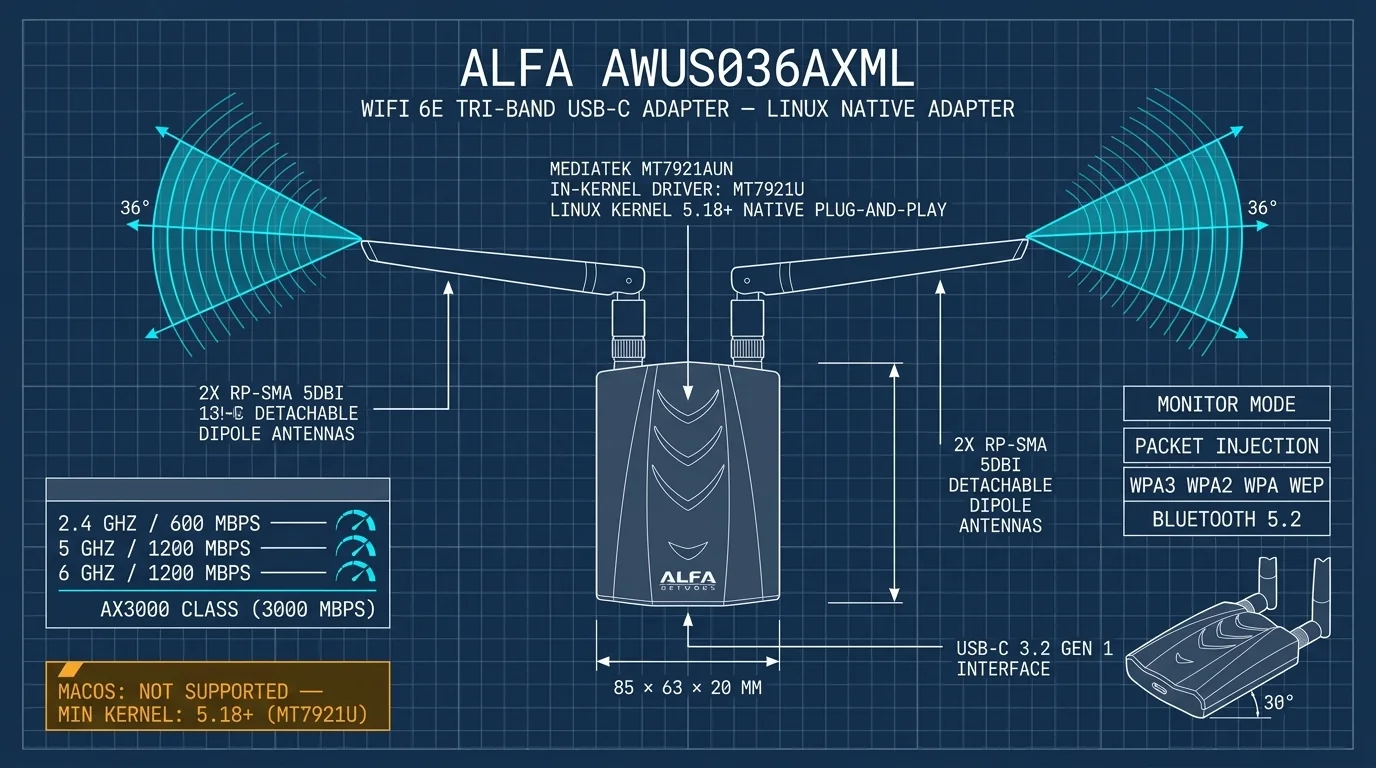
Stop Recompiling Drivers: Why MT7921AU Wins on Linux & Kali
Table of Contents
Product covered: ALFA AWUS036AXML (MediaTek MT7921AUN / MT7921AUN) | Comparison unit: ALFA AWUS036ACH (Realtek RTL8812AU) Who this is for: Kali Linux penetration testers, Linux embedded developers, Raspberry Pi / single-board computer users Goal of this article: Understand the difference between “native in-kernel support” and “DKMS driver compilation” before you buy — and spend less time installing and troubleshooting.
The Opening: Those Days of “Recompile the Driver After Every System Update”#
If you have used a USB adapter built around a Realtek RTL8812AU-class chipset (like the popular AWUS036ACH), you have probably been through something like this:
- You install a community-maintained driver; internet and monitoring work fine.
- One day you run
sudo apt upgrade, and the Linux kernel moves to a new version. - After reboot, the adapter disappears from the system — no Wi-Fi interface (
wlan0/wlan1) anywhere. - You end up downloading the source again, installing DKMS, and recompiling the kernel module — burning an entire afternoon.
The problem is not the hardware. It is the form the driver takes. Most Realtek Linux drivers are not merged into the Linux kernel (mainline). To use them, you have to bolt external source code onto your system. Every time the kernel is upgraded, that bolt-on has to be recompiled — otherwise it stops matching the new kernel and fails.
Today’s protagonist — the ALFA AWUS036AXML with the MediaTek MT7921AUN — takes a completely different path: its driver lives natively inside the Linux kernel.
1. Why Realtek Driver Builds Break When the Linux Kernel Updates#
1.1 Kernel Modules Are Tied to a Specific Kernel Version#
The Linux kernel loads device drivers dynamically as “modules.” The key point: a module is compiled against a specific kernel version. After a major kernel update (for example 6.8 → 6.9), old modules usually cannot load on the new kernel — they must be recompiled.
1.2 DKMS: An Auto-Recompile Lifeline with New Pitfalls#
DKMS (Dynamic Kernel Module Support) exists precisely to solve the “kernel updates, module must be rebuilt” pain. On every kernel upgrade, it automatically recompiles the driver for you. It sounds great, but in practice you still run into:
- Toolchain issues: Building requires
build-essential,dkms, and the native kernel headers (linux-headers-$(uname -r)). If any piece is missing, the DKMS build fails outright. - Version incompatibility: The worst case is a kernel upgrade that lands before the GitHub driver catches up with new API changes. You never know whether the next
apt upgradewill be the one that breaks. - Secure Boot / kernel module signing: If Secure Boot is enabled, unsigned kernel modules are refused by the system — the adapter’s interface never even appears. You cannot fix this by disabling security; the correct path is importing a self-signed certificate through the MOK (Machine Owner Key) mechanism. One more chore.
- Community fork anxiety: The same chipset has multiple GitHub branches —
aircrack-ng/rtl8812au,morrownr/8812au-20210820, and others — with different versions and different kernel support ranges. Pick the wrong one and the whole build is wasted.
1.3 Your Time Is the Real Cost#
If you only compile once at install time, fine. But as long as the system keeps updating, that driver is a permanent maintenance burden. For penetration testers and embedded developers, precious time should go into tools and scripts — not into recompiling a Wi-Fi adapter driver.
2. MediaTek MT7921AU: Why “Native Support, Plug-and-Play” Works#
2.1 How Native Support Happens: mt76 and mt7921u#
MediaTek’s Wi-Fi chipset drivers have long lived inside the mt76 wireless driver framework in the Linux kernel. The MT7921 family comes in PCIe and USB variants:
- The MT7921 family first entered mainline with Linux Kernel 5.12 (PCIe / M.2 versions);
- The AWUS036AXML uses the USB
mt7921udriver, natively included in mainline since Linux Kernel 5.18.
In other words, there is no source code to fetch from GitHub, no DKMS, no self-compilation. As long as your distro’s kernel is new enough, you plug in the adapter, add the firmware files, and you are done. The interface shows up in ip link.
2.2 You Only Need Firmware — Not Driver Source Code#
Many people assume “no compilation” means “nothing to install.” Not quite: “no driver compilation” does not mean “no installation at all.” The MT7921AU needs firmware files, not driver source code. Firmware is managed as a distro package, usually with a single command:
sudo apt update
sudo apt install linux-firmware firmware-misc-nonfree   # Debian / Kali family
sudo reboot
Ubuntu’s usual approach:
sudo apt update
sudo apt install linux-firmware
sudo reboot
Firmware is a package that “follows the distro” — a kernel upgrade cannot break it. That is the fundamental maintenance difference versus a DKMS driver.
Minimum kernel requirements per distro, at a glance:
| OS / Distro | Minimum kernel | Driver compilation needed? |
|---|---|---|
| Kali Linux (Rolling) | 6.x (includes mt7921u) | No, just add firmware |
| Debian 12 | 6.1 LTS | No |
| Ubuntu 22.04+ / 24.04 LTS | 5.18+ (HWE kernel recommended) | No |
| Raspberry Pi OS (Bookworm) | 6.1 LTS | No |
| Older Linux distros | Below 5.18 | Extra deployment needed; not recommended |
| Windows 10 / 11 | — | Vendor driver |
| macOS (Intel / Apple Silicon) | Not supported | No driver — do not buy |
⚠️ The most important support note before you buy: The AWUS036AXML does not support macOS. Neither Intel nor Apple Silicon has a usable MT7921AUN macOS driver today. If macOS is your primary environment, this class of Wi-Fi 6 / 6E USB adapter is a dead end for you — rule it out now, before you find out after buying.
2.3 Why Native Support Matters Especially to Kali Developers#
On Kali Linux, kernel upgrades are very frequent (it is a Rolling release). RTL8812AU users hold their breath at every rolling update. mt7921u, by contrast, is maintained and tested together with the kernel — no matter how new the kernel gets, the driver keeps up. ALFA positioned this product for security testing: monitor mode works out of the box, while packet injection depends on the kernel version (see section 3.2).
3. AWUS036AXML on Kali Linux: Plug-and-Play and Monitor Mode in Practice#
3.1 Plug In, Confirm, Get to Work: Three Steps#
Plug the adapter into a USB-C port (the included 2-in-1 USB-C/USB-A cable helps), then run:
lsusb                 # should show a MediaTek device with ID 0e8d:7961
ip link               # a wlanX interface should appear
sudo apt install linux-firmware firmware-misc-nonfree
sudo reboot
After reboot, confirm the interface:
iwconfig              # wlanX should show Managed mode
ip addr show wlanX    # address acquired normally
Even for default connections, NetworkManager on mainstream distros (Kali included) sees it directly — no GitHub source site needed.
The first time I plugged the AXML into Kali, seeing 0e8d:7961 in lsusb was all the reassurance I needed — no clone, no compilation, and the interface appeared by itself after reboot.
3.2 Monitor Mode and Packet Injection Tests#
Assuming your interface is wlan1:
sudo ip link set wlan1 down
sudo iw dev wlan1 set type monitor
sudo ip link set wlan1 up
iw dev wlan1 info     # confirm type shows monitor
There you go — wlan1 is now passively listening to 802.11 frames, ready for Wireshark or the aircrack-ng suite.
Next, test packet injection:
sudo aireplay-ng --test wlan1On kernel 6.16 and earlier, community reports show Injection is working! (or equivalent output) on the native mt7921u driver. On stock kernel 6.16 and later (tested on ASUS GX10, Ubuntu 24.04 ARM64, kernel 6.17), however, the injection test fails: aireplay-ng --test shows Found 0 APs / No Answer, so deauth and handshake capture are not possible. The cause is a mac80211 chanctx regression since kernel 6.16, not a limitation of the chip itself; community patched drivers make injection work, but the firmware still locks the rate (1/6 Mbps, no HT/VHT injection). If you need injection, use the AWUS036ACH, EACS or ACS instead.
3.3 Fusion Mode (VIF): Manage and Monitor at the Same Time#
Many penetration scenarios need the adapter to “stay online as a client while monitoring at the same time.” The native driver supports this through Virtual Interfaces:
sudo iw dev wlan1 interface add mon0 type monitor
sudo ip link set mon0 up
Now wlan1 stays in managed mode (for internet), while mon0 handles monitoring. Making this reliably work on an RTL8812AU driver usually means editing a pile of config files — the native driver simply hands you the capability.
⚠️ The legal-use red line: Test monitor mode, packet injection, Evil Twin, and similar capabilities only on networks you own or are explicitly authorized to test (your own lab, a company-authorized test segment). Any unauthorized network reconnaissance or intrusion may violate local law. Stay within legal boundaries — this article is a technical explanation for academic and engineering purposes.
4. Pre-Purchase Evaluation Worksheet: “Native, No-Compile” or “DKMS Adapter”?#
To keep post-purchase support costs low, run this quick evaluation before deciding between the AWUS036AXML and the AWUS036ACH.
4.1 The Two Adapters Side by Side#
| Evaluation item | AWUS036AXML (MT7921AUN) | AWUS036ACH (RTL8812AU) |
|---|---|---|
| Wireless spec | Wi-Fi 6E tri-band (2.4/5/6 GHz) | AC1200 dual-band (2.4/5 GHz) |
| USB interface | USB-C (USB 3.2 Gen 1) | USB 3.0 Type-A |
| Linux driver | mt7921u native in kernel 5.18+ | External DKMS compilation required |
| Installation difficulty | Just add firmware | Toolchain + compilation + (with Secure Boot) signing |
| Kernel upgrade impact | None | Recompile after every upgrade |
| Monitor mode | Native support | Supported |
| Packet injection | ⚠️ Community reports before kernel 6.16; failed on 6.17 in testing | Supported |
| macOS | Not supported | Not supported |
| Best for | Modern Linux / Kali / embedded | Older systems or 2.4/5 GHz scenarios |
4.2 The 30-Second Decision Checklist#
The more boxes you tick, the more the AWUS036AXML is the right pick:
- My main system is Kali Linux / Ubuntu / Debian with kernel 5.18 or newer.
- I want it to work right out of the box — no
dkms, nogithub clone, no build toolchain. - I want native
mt76-family support, and kernel upgrades must not affect the adapter. - I need the 6 GHz band (Wi-Fi 6E router environment).
- Primary uses: monitoring, Soft AP, fusion mode (VIF). (Packet injection does not work on kernel 6.16 and later, see section 3.2.)
- I will use the included USB-C / USB-A 2-in-1 cable with a laptop or single-board computer.
Conversely, if you have no 6 GHz need, your system runs an older kernel below 5.18, and you are comfortable with the DKMS maintenance workflow, the AWUS036ACH still has its place. Just be mentally prepared: every kernel update means recompiling the driver.
5. Conclusion#
For modern Linux and Kali developers, time is the biggest cost. The MediaTek MT7921AUN (AWUS036AXML) lifts the endless burden of driver maintenance off your shoulders. The driver lives in the kernel, firmware comes in one package, monitoring works out of the box (packet injection fails on stock kernel 6.16 and later; use ACH, EACS or ACS if you need injection) — rolling kernel updates are nothing to fear.
Before buying, confirm just two things: kernel ≥ 5.18 and not macOS. The native driver handles the rest.
Appendix: Quick Troubleshooting Intake (For Support and Users)#
If the interface does not appear after plugging in the adapter, check in order:
- Does
lsusbshow0e8d:7961(MediaTek)? → If not, try another USB port or check power delivery. - Run
sudo apt install linux-firmware firmware-misc-nonfreeand reboot → missing firmware is the #1 cause. - Does
ip linkshowwlanX? → If not, check whether the kernel version (uname -r) is ≥ 5.18. - First confirm the OS is not macOS — this product has no macOS driver; do not send it in for repair for this.
- If everything above is fine but monitoring still fails, check whether you are mistakenly in managed mode (
iw dev wlanX infoto inspect type).
Disclaimer: The driver support and kernel versions described here are based on Linux mainline and official packages from major distros; packaging and kernel configuration may vary slightly between distros. This article makes no official compatibility promises for any commercial closed-source platform or brand. Run all functional tests in a legally authorized environment.