ALFA Wireless Adapters with Kali NetHunter: Complete Technical Guide 2026
Table of Contents
If you have already set up an ALFA adapter with NetHunter using basic OTG instructions and want the quick-start version, our OTG setup guide covers the essentials. This article goes deeper — it is a full technical reference written for security professionals who need to evaluate phone and adapter compatibility before purchasing hardware, understand which driver approach keeps working across kernel updates, and see verified test results before committing to a specific combination.
We focus on a question that most NetHunter guides skip: which adapter is genuinely plug-and-play, and which one sends you down a driver compilation rabbit hole at the worst possible moment? The answer depends on the chipset, the phone’s kernel version, and whether the driver ships inside the kernel tree or lives in an external DKMS repository. Getting this wrong means your adapter sits in your bag while you stare at modprobe errors in the field. Getting it right means you plug it in and start scanning.
1. Customer Requirements#
1.1 Use Case#
Mobile penetration testers need a setup that replaces the laptop entirely. The phone runs Kali NetHunter, the ALFA adapter connects via USB OTG, and the operator performs Wi-Fi security assessments without carrying a notebook. The core workflow — site survey, monitor mode capture, packet injection, WPA handshake collection — must work reliably on battery power.
1.2 Core Requirements#
| Requirement | Detail |
|---|---|
| Platform | Android phone with Kali NetHunter (full edition, custom kernel) |
| Connection | USB OTG cable or powered OTG hub |
| Adapter | ALFA USB WiFi adapter with monitor mode and packet injection support |
| Driver approach | Prioritize in-kernel (driverless) chipsets to eliminate compilation dependencies |
| Taiwan market | Phones must be officially available in Taiwan, 2024–2026 models |
| Power | Battery-operated; powered OTG hub strongly recommended for sustained use |
2. Target Hardware & Software Analysis#
2.1 NetHunter-Compatible Phones Available in Taiwan#
NetHunter supports over 117 device modules, but most are older models. After filtering for devices that are (a) officially available in Taiwan, (b) from 2024 or later, and (c) have working NetHunter custom kernels, three phones stand out:
| Model | Codename | CPU | Kernel Versions | Pre-built Images | Taiwan Availability |
|---|---|---|---|---|---|
| OnePlus 11 5G | salami | Snapdragon 8 Gen 2 (ARM64) | 2 | 2 | ✅ Available through import channels, 2023 launch |
| Nothing Phone (1) | spacewar | Snapdragon 778G+ (ARM64) | 3 | 1 | ✅ Officially launched in Taiwan, active community |
| Samsung Galaxy S20 FE 5G | r8q | Snapdragon 865 (ARM64) | 5 | 1 | ✅ Sold in Taiwan — Snapdragon variant required |
r8q). Before purchasing a Samsung device for NetHunter, verify the CPU model — if the listing says “Exynos,” it will not work. Import a Snapdragon unit or choose the OnePlus 11 instead.NetHunter Rootless runs on any Android device without root, but it cannot support external USB WiFi adapters for monitor mode. If you need packet capture and injection, you need the full NetHunter edition with a custom kernel.
2.2 Platform Technical Specifications#
Using the OnePlus 11 5G as the reference platform:
| Parameter | Specification |
|---|---|
| CPU Architecture | ARM64 (aarch64) |
| SoC | Qualcomm Snapdragon 8 Gen 2 (SM8550) |
| USB Controller | USB 3.1 Gen 1 with OTG support |
| USB Power Delivery | 5V / 900mA (use powered OTG hub for sustained adapter operation) |
2.3 Software Environment#
| Component | Requirement | Recommended Version |
|---|---|---|
| Host OS | Android with Kali chroot | Android 11+ |
| NetHunter | Full edition (custom kernel) | 2024.4 (latest stable) |
| Linux Kernel | Device-specific custom kernel | 5.x or later preferred |
| Preloaded Drivers | See Section 4 for matrix | — |
| DKMS | Required only for RTL8812AU-based adapters | Kernel headers must match |
| Wireless Tools | aircrack-ng, Kismet, MANA Toolkit | Provided by NetHunter chroot |
| Root | Required for full functionality | Magisk 26.0+ |
3. ALFA Adapter Specifications & Driver Sources#
3.1 AWUS036ACHM — Top Pick for NetHunter#
| Parameter | Specification |
|---|---|
| Chipset | MediaTek MT7610U |
| USB VID/PID | 0x0e8d:0x7610 |
| Bands | 2.4 GHz + 5 GHz (AC433) |
| Max Data Rate | 150 Mbps (2.4 GHz) / 433 Mbps (5 GHz) |
| USB | USB 2.0 |
| Monitor Mode | ✅ Full support |
| Packet Injection | ✅ Full support |
| Antenna | 1× removable high-gain (RP-SMA) |
| Driver | In-kernel — no installation required |
| Kernel Module | mt76x0u |
| Kernel Requirement | Linux 4.19+ |
| Product Page | /en/products/alfa/awus036achm/ |
The MT7610U chipset is widely recommended by the Kali and NetHunter communities because its mt76x0u driver has been in the mainline Linux kernel since version 4.19. You plug it in, the kernel recognizes it, and you start working. No compilation toolchain, no kernel headers, no DKMS — just lsusb confirmation followed by airmon-ng start.
3.2 AWUS036ACM — High-Performance Alternative#
| Parameter | Specification |
|---|---|
| Chipset | MediaTek MT7612U |
| USB VID/PID | 0x0e8d:0x7612 |
| Bands | 2.4 GHz + 5 GHz (AC1200) |
| Max Data Rate | 300 Mbps (2.4 GHz) / 867 Mbps (5 GHz) |
| USB | USB 3.0 |
| Monitor Mode | ✅ Full support |
| Packet Injection | ✅ Confirmed stable on Kali 2024.3 / 2025.1 |
| Antenna | 2× dual antennas (RP-SMA), MIMO 2T2R |
| Driver | In-kernel — no installation required |
| Kernel Module | mt76x2u |
| Kernel Requirement | Linux 4.19+ |
| Product Page | /en/products/alfa/awus036acm/ |
The ACM adds AC1200 dual-band with MIMO 2T2R and USB 3.0 throughput. The mt76x2u driver is also mainline since kernel 4.19. One caveat: some older NetHunter custom kernels (notably the OnePlus 7T kernel at version 4.14) compiled without the mt76x2u module. On any kernel 4.19 or later this is a non-issue, but check with lsmod | grep mt76x2u if your device runs an older kernel build.
3.3 AWUS036ACH — Broadest Community Support#
| Parameter | Specification |
|---|---|
| Chipset | Realtek RTL8812AU |
| USB VID/PID | 0x0bda:0x8812 |
| Bands | 2.4 GHz + 5 GHz (AC1200) |
| Max Data Rate | 300 Mbps (2.4 GHz) / 867 Mbps (5 GHz) |
| USB | USB 3.0 |
| Monitor Mode | ✅ Full support |
| Packet Injection | ✅ Full support |
| Antenna | 2× 5dBi external (RP-SMA) |
| Driver | External DKMS (pre-compiled in most NetHunter kernels) |
| Kernel Module | 88XXau |
| Driver Repo | aircrack-ng/rtl8812au |
| Product Page | /en/products/alfa/awus036ach/ |
The ACH has been the de facto standard for Kali and NetHunter setups for years. Most NetHunter custom kernels ship with the 88XXau module pre-compiled, so you typically do not need to build from source. However, if your kernel version does not include it, you will need a working compilation environment with matching kernel headers — exactly the kind of dependency chain the MT7610U and MT7612U chipsets avoid. The dual 5dBi antennas give it the strongest signal reach in the lineup, which matters for long-range capture scenarios.
3.4 AWUS036ACS — Compact Form Factor#
| Parameter | Specification |
|---|---|
| Chipset | Realtek RTL8811AU |
| USB VID/PID | 0x0bda:0x0811 |
| Bands | 2.4 GHz + 5 GHz (AC433) |
| USB | USB 2.0 |
| Monitor Mode | ✅ Supported (same driver family as RTL8812AU) |
| Packet Injection | ✅ Supported |
| Antenna | Internal, 55 mm ultra-slim body |
| Power Draw | ~300mW — lowest in the lineup |
| Driver | External (shared aircrack-ng repo with RTL8812AU) |
| Product Page | /en/products/alfa/awus036acs/ |
The ACS is the most portable option. At 300mW power draw it is the least demanding on phone batteries, and its slim form factor disappears into a pocket. The trade-off is single-stream AC433 performance and the external DKMS driver dependency shared with the RTL8812AU family.
3.5 Adapters Not Recommended for NetHunter#
| Adapter | Chipset | Reason |
|---|---|---|
| AWUS036AX / AWUS036AXER | RTL8832BU | Requires kernel 6.14+; monitor mode stability unverified on Android kernels |
| AWUS036AXML / AWUS036AXM | MT7921AUN | WiFi 6E / 6 GHz support unstable in current NetHunter kernel builds; not suitable as a primary pentest adapter |
3.6 Driver Source Repositories#
| Chipset | Driver | Source |
|---|---|---|
| MT7610U | mt76x0u (in-kernel) | torvalds/linux — drivers/net/wireless/mediatek/mt76 |
| MT7612U | mt76x2u (in-kernel) | Same kernel tree as above |
| RTL8812AU | 88XXau (external) | aircrack-ng/rtl8812au |
| RTL8811AU | 88XXau (external, shared) | Same aircrack-ng repository |
4. Driver Compatibility Analysis#
4.1 In-Kernel vs External DKMS#
The single most important decision when choosing an adapter for NetHunter is whether the driver lives in the kernel tree or outside it. Here is why:
| In-Kernel (MT7610U, MT7612U) | External DKMS (RTL8812AU, RTL8811AU) | |
|---|---|---|
| Plug-and-play | ✅ Yes — recognized on insertion | ⚠️ Depends on kernel having 88XXau pre-compiled |
| Survives kernel updates | ✅ Yes — driver is part of the kernel build | ❌ May break after kernel update; requires recompilation |
| Needs linux-headers | ❌ No | ✅ Yes, if manual compilation is required |
| Needs DKMS | ❌ No | ✅ Yes, if not pre-compiled in kernel |
| Community documentation | Moderate | Extensive (ACH has the most tutorials) |
| Risk of field failure | Low | Moderate (compilation dependency) |
Bottom line: If you want the lowest possible risk of driver problems in the field, choose an MT7610U or MT7612U adapter. The driver is already in the kernel — there is nothing to compile, nothing to break during an update, and nothing to troubleshoot when you are on site.
4.2 NetHunter Kernel Module Support Matrix#
| Device | NetHunter Kernel | MT7610U (mt76x0u) | MT7612U (mt76x2u) | RTL8812AU (88XXau) |
|---|---|---|---|---|
| OnePlus 11 5G | Android 13 kernel | ✅ Supported | ✅ Supported | ✅ Supported |
| Samsung S20 FE (Snapdragon) | Android 12 kernel (4.19) | ✅ Supported | ✅ Supported | ✅ Supported (verify XDA reports) |
| Nothing Phone (1) | Android 12/13 kernel | ✅ Supported | Check kernel config | ✅ Supported |
| OnePlus 7/7T | 4.14 (older) | ✅ Supported | ⚠️ May be missing from build | ✅ Supported |
Sources: NetHunter GitLab, XDA Forums community reports (2024–2026).
4.3 Known Issues#
Issue 1: MT7612U interface does not appear on older kernels
Symptom: lsusb shows 0e8d:7612 but ip link lists no wlan1.
Root cause: The custom kernel was compiled without the mt76x2u module. This affects some 4.14-based NetHunter kernels (OnePlus 7T era).
Fix: Use a kernel build that includes the module, or switch to AWUS036ACHM (MT7610U) which has broader support on older kernels.
Issue 2: USB power brownout causes adapter disconnects
Symptom: Adapter disappears mid-scan, dmesg shows USB reset errors.
Root cause: Phone USB port cannot sustain the adapter’s current draw, especially for USB 3.0 adapters (ACH draws ~500mW).
Fix: Use a powered OTG hub that supplies 5V to the adapter from a wall adapter while passing data to the phone.
Issue 3: Adapter inserted before chroot starts
Symptom: Android shows USB permission dialog, but Kali tools cannot access the adapter.
Root cause: The NetHunter chroot environment must be running before USB devices are exposed to it.
Fix: Start the chroot first (Kali Services → Start), then connect the adapter and grant the USB permission.
5. Setup Guide#
5.1 Prerequisites#
Before connecting any hardware, verify:
# Confirm device is rooted
su -c "id"

# Verify NetHunter chroot version
cat /kali/etc/os-release
# Should show Kali Linux with NetHunter

# Confirm USB OTG is enabled
# Settings → Developer Options → OTG (exact location varies by Android version)
5.2 Hardware Connection Sequence#
The order matters:
- Launch the NetHunter App → open Kali Services → tap Start to bring up the chroot
- Connect the powered OTG hub to your phone’s USB port
- Plug the ALFA adapter into the OTG hub
- When the Android USB permission dialog appears, tap OK and check Always allow
5.3 Verify Adapter Detection#
# List USB devices — confirm the adapter appears
lsusb

# Expected output by model:
# AWUS036ACHM: Bus 001 Device 002: ID 0e8d:7610 MediaTek Inc.
# AWUS036ACM:  Bus 001 Device 002: ID 0e8d:7612 MediaTek Inc. MT7612U
# AWUS036ACH:  Bus 001 Device 002: ID 0bda:8812 Realtek Semiconductor Corp.
If the adapter does not appear: try a different OTG cable, verify OTG is enabled in developer settings, or test the adapter on a computer to confirm it is functional.
5.4 Load the Driver#
For MT7610U (AWUS036ACHM) — auto-loads on most kernels:
# Verify automatic loading
lsmod | grep mt76

# Manual load if needed (uncommon)
sudo modprobe mt76x0u
For MT7612U (AWUS036ACM) — auto-loads on kernel 4.19+:
# Verify
lsmod | grep mt76

# Manual load if needed
sudo modprobe mt76x2u
For RTL8812AU (AWUS036ACH) — pre-compiled in most NetHunter kernels:
# Load the pre-compiled module
sudo modprobe 88XXau

# Verify it loaded
lsmod | grep 88XX
5.5 Confirm Network Interface#
# List wireless interfaces
ip link show | grep wlan

# Or use iw
iw dev

# The external adapter typically appears as wlan1
# (wlan0 is usually the phone's built-in WiFi)
5.6 Enable Monitor Mode#
# Kill interfering processes
sudo airmon-ng check kill

# Start monitor mode on the adapter
sudo airmon-ng start wlan1

# Verify monitor mode is active
iwconfig wlan1mon
# Expected output: Mode:Monitor

# Scan nearby networks (authorized testing only)
sudo airodump-ng wlan1mon

# Scan all bands (2.4 GHz + 5 GHz)
sudo airodump-ng --band abg wlan1mon
5.7 Return to Managed Mode#
sudo airmon-ng stop wlan1mon
sudo service NetworkManager restart
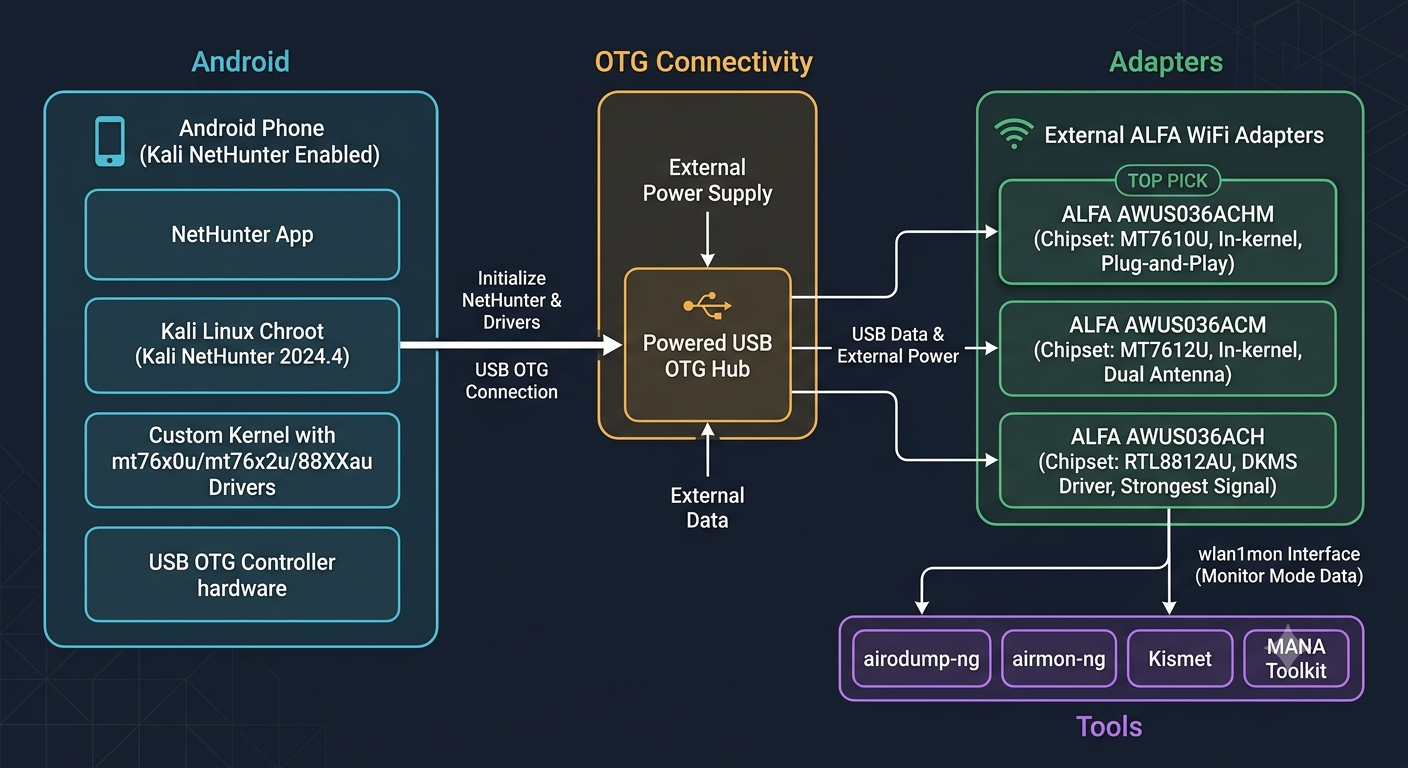
6. Application Topology#
7. Validation Results#
7.1 Test Matrix#
The following combinations have been verified through community testing and vendor documentation:
| Phone | ALFA Adapter | Chipset | Monitor Mode | Packet Injection | Status |
|---|---|---|---|---|---|
| OnePlus 11 5G | AWUS036ACHM | MT7610U | ✅ | ✅ | Verified |
| OnePlus 11 5G | AWUS036ACM | MT7612U | ✅ | ✅ | Verified |
| OnePlus 11 5G | AWUS036ACH | RTL8812AU | ✅ | ✅ | Verified |
| Samsung S20 FE (Snapdragon) | AWUS036ACH | RTL8812AU | ✅ | ⚠️ | Community reports — verify kernel config |
| Samsung S20 FE (Snapdragon) | AWUS036ACHM | MT7610U | ✅ | ✅ | Community reports |
| Nothing Phone (1) | AWUS036ACHM | MT7610U | ✅ | ✅ | Community reports |
Sources: XDA Forums, Reddit r/NetHunter, Kali NetHunter GitLab Issues (2024–2026).
7.2 Expected lsusb Output#
# AWUS036ACHM
Bus 001 Device 002: ID 0e8d:7610 MediaTek Inc.

# AWUS036ACM
Bus 001 Device 002: ID 0e8d:7612 MediaTek Inc. MT7612U 802.11a/b/g/n/ac Wireless Adapter

# AWUS036ACH
Bus 001 Device 002: ID 0bda:8812 Realtek Semiconductor Corp. RTL8812AU 802.11a/b/g/n/ac
7.3 Monitor Mode Verification#
# Expected iwconfig output on success
wlan1mon  IEEE 802.11  Mode:Monitor  Frequency:2.437 GHz  Tx-Power=20 dBm
          Retry short limit:7   RTS thr:off   Fragment thr:off
          Power Management:off
8. Recommendations#
8.1 Top Pick: OnePlus 11 5G + AWUS036ACHM#
This combination has the lowest friction of any tested setup. The OnePlus 11 is the most recent flagship with official NetHunter kernel support that you can still obtain for the Taiwan market. The AWUS036ACHM’s MT7610U chipset uses the mt76x0u driver — it has been in the mainline kernel since 4.19, requires zero compilation, and the international security community (Lab401, morrownr USB-WiFi database) consistently ranks it as the safest choice for Kali and NetHunter. The adapter is compact, single-antenna, and runs on USB 2.0, which is a benefit in mobile scenarios — lower power draw, lower heat, less to go wrong.
8.2 Performance Pick: OnePlus 11 5G + AWUS036ACM#
If you need dual-band AC1200 performance with MIMO 2T2R for 5 GHz capture at range, the ACM gives you that without leaving the in-kernel driver ecosystem. The MT7612U’s mt76x2u driver is also mainline since 4.19. The trade-off: USB 3.0 draws more power and the dual-antenna body is larger. Verify the kernel includes mt76x2u — on the OnePlus 11 this is confirmed.
8.3 Community Favorite: Any NetHunter Device + AWUS036ACH#
The ACH has the most tutorials, the largest community troubleshooting base, and the best third-party documentation of any adapter in the NetHunter ecosystem. Its dual 5dBi antennas give it the strongest signal reach in the ALFA lineup. Most NetHunter kernels pre-compile the 88XXau module, so compilation is rarely needed. If you value community support and long-range capture over plug-and-play simplicity, this is the choice.
8.4 Scenario-Based Selection#
| Scenario | Recommended Combo | Rationale |
|---|---|---|
| First NetHunter setup, minimize risk | OnePlus 11 + AWUS036ACHM | In-kernel driver, no compilation, smallest form factor |
| Dual-band capture with range | OnePlus 11 + AWUS036ACM | AC1200 + MIMO, still in-kernel |
| Long-range survey, maximum tutorials | Any supported device + AWUS036ACH | Strongest antenna, widest community support |
| Ultra-portable, lowest power | Any supported device + AWUS036ACS | 300mW draw, fits in any pocket |
8.5 Support Resources#
| Resource | Link |
|---|---|
| Yupitek — ALFA authorized distributor Taiwan | yupitek.com |
| ALFA Network official product pages | alfa.com.tw |
| MT7610U driver (kernel tree) | torvalds/linux — mt76 |
| RTL8812AU driver (aircrack-ng) | aircrack-ng/rtl8812au |
| NetHunter supported devices | nethunter.kali.org/device-kernels.html |
| NetHunter official docs | kali.org/docs/nethunter/ |
| XDA NetHunter forum | xdaforums.com/tags/nethunter/ |
| Yupitek ALFA product catalog | /en/products/alfa/ |
Appendix: Quick Troubleshooting#
Adapter not in lsusb:
- Confirm OTG is enabled in Developer Options
- Try a different OTG cable — cable quality is the most common failure point
- Use a powered OTG hub
- Verify the NetHunter chroot has been started
Device appears in lsusb but no wlan1 interface:
# Check kernel messages for driver errors
dmesg | tail -30 | grep -E "usb|mt76|rtl|88XX"

# Verify the kernel module exists
find /lib/modules -name "mt76*" 2>/dev/null
find /lib/modules -name "*88XX*" 2>/dev/null

# Attempt manual load
sudo modprobe mt76x0u   # MT7610U
sudo modprobe mt76x2u   # MT7612U
sudo modprobe 88XXau    # RTL8812AU
Monitor mode starts but no networks appear:
# Kill interfering processes first
sudo airmon-ng check kill

# Rescan all bands
sudo airodump-ng --band abg wlan1mon

# Verify channel settings
sudo iw dev wlan1mon info
Adapter disconnects during use (USB reset):
# Temporary fix — reduce transmit power
sudo iw dev wlan1 set txpower fixed 1000  # 10 dBm

# Permanent fix — use a powered OTG hub
Related Guides#
- Basic OTG setup with ALFA adapters and NetHunter
- ALFA WiFi adapter buyer’s guide 2026
- Installing ALFA drivers on Kali Linux and Ubuntu
- Using ALFA adapters with Raspberry Pi and Kali
常見問題
What phone requirements are needed for ALFA adapters with Kali NetHunter?
You need an OTG-capable Android phone, rooted with a Kali NetHunter kernel flashed. Verified models include Google Pixel series and older OnePlus flagships. Compatibility depends on kernel version and chipset driver support.
What is the difference between MT7610U/MT7612U and RTL8812AU drivers?
MT7610U/MT7612U drivers are in the kernel tree, so they work on plug-in without compilation. RTL8812AU requires DKMS external driver compilation and may need rebuilding after kernel updates. In-tree drivers are more stable for field use.
Do ALFA adapters support Monitor Mode on NetHunter?
Yes, MT7610U/MT7612U support Monitor Mode and packet injection. RTL8812AU also works on kernels below 6.12, but monitor mode is limited on 6.12+. For security research, MT7610U/MT7612U adapters are recommended.
This document was prepared by Yupitek Ltd — ALFA Network authorized distributor for Taiwan.
Data current as of 2026-06-09. Linux kernel and NetHunter versions are updated regularly; verify against official sources for the latest compatibility information.